 GovDesk 365
Digital Workplace Service Desk for Microsoft 365
The internal service desk that lives where your people already work.
Staff submit and track requests from Teams and Outlook without leaving their daily workflow. Technicians work the queue from desktop, iPad, or mobile. Zero per-seat license fees, zero cultural disruption, and 100% inside your own Microsoft 365 tenant.
- Zero Disruption: Native in Teams & Outlook (Desktop, iPad & Mobile)
- Unlimited Scaling: Zero per-seat fees for IT, Facilities & HR
- 100% In-Tenant: All data stays securely in your Microsoft 365
- Instant Rollout: No alien external portals to train or ignore
The problem
Staff skip disconnected external portals and email the tech they know.
Most internal service desks fail because they force employees out of their daily workflow into an alien third-party portal. Requests leak into inboxes, direct chats, and hallway conversations—while per-seat SaaS bills keep climbing.
A ticketing tool nobody opens
Requests arrive by Teams chat and direct email. Technicians retype them, or don't.
A shared mailbox and a spreadsheet
Work orders get lost. Nobody can say how long a repair took or who has it.
Email threads and memory
Sensitive requests sit in personal inboxes with no history and no handoff.
How it works
Don't move people to the help desk. Move the help desk to them.
For staff
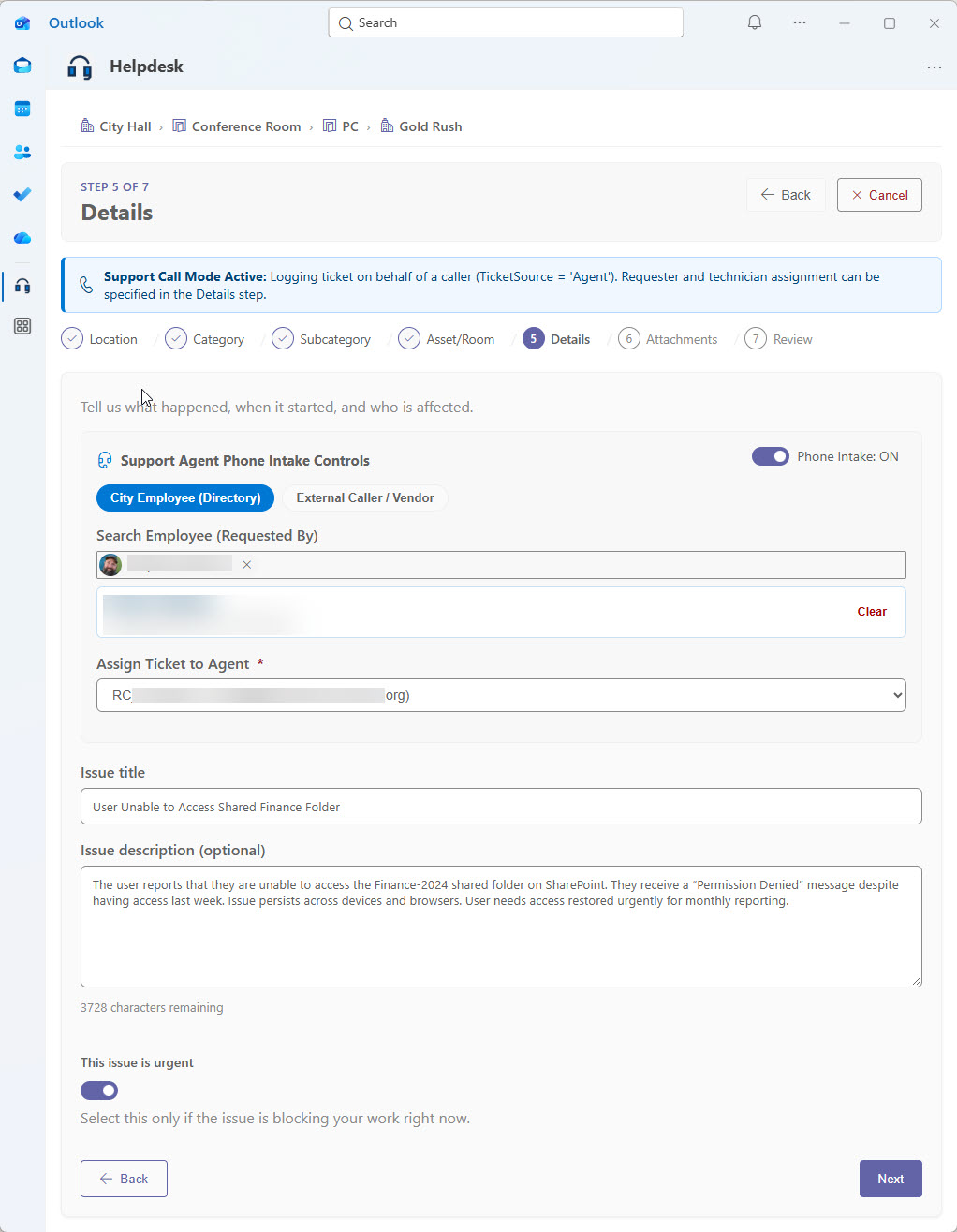
Seven guided steps. No guessing which printer.
A pinned Teams app walks people from building to the exact room or device, so technicians stop asking follow-up questions.
- Building, category, then the exact room or device
- Photos and PDFs attached at intake
- Live SLA countdown on every open request
- One click to chat with the assigned technician
For technicians
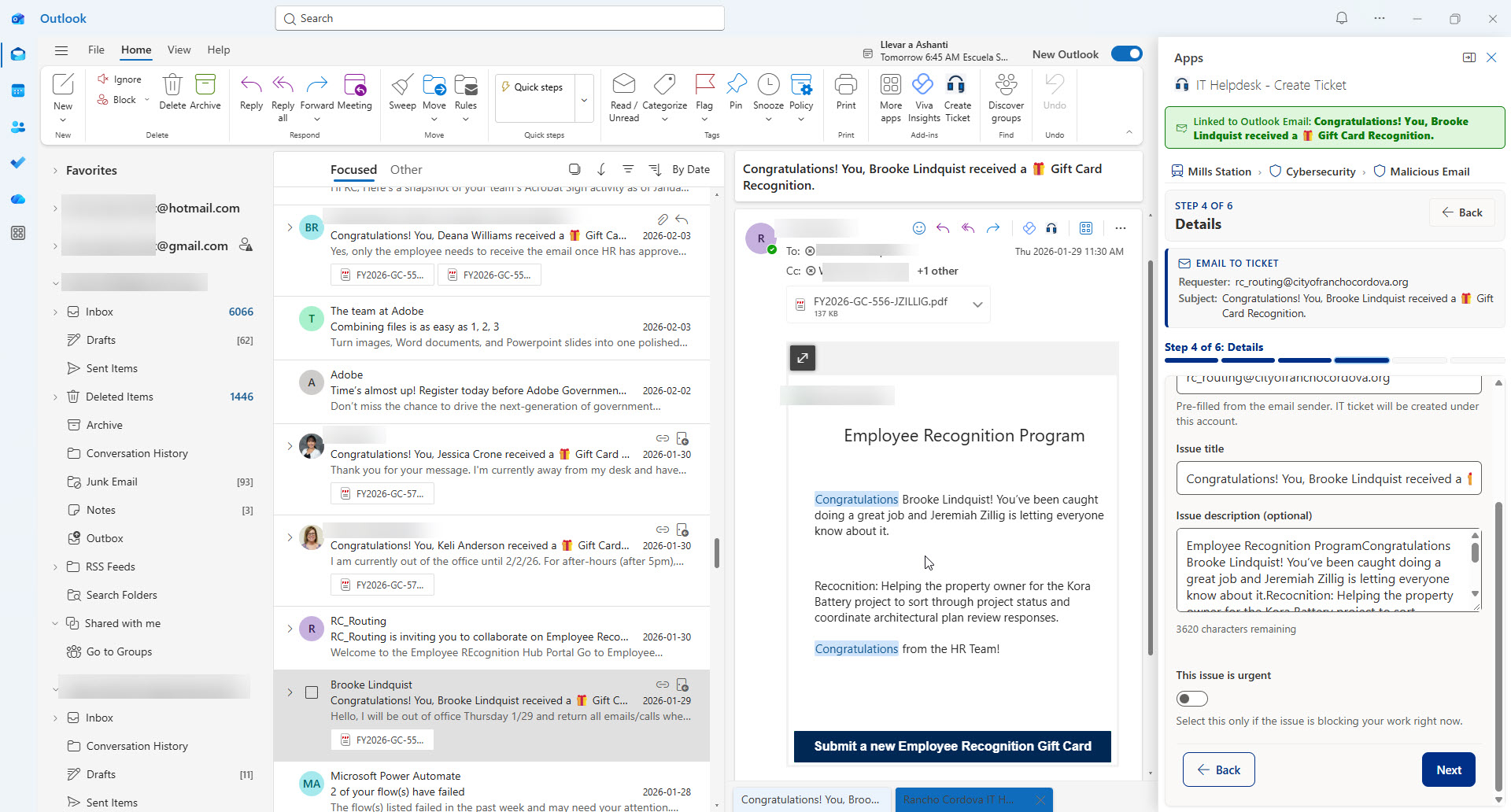
That email is a ticket now.
A Create Ticket button on the Outlook ribbon turns any request email into a tracked ticket, with the requester, title and description already filled in.
- Works in new Outlook and Outlook on the web
- A shared help desk mailbox can create tickets on its own
- Replies with the ticket number thread back onto the ticket
The queue
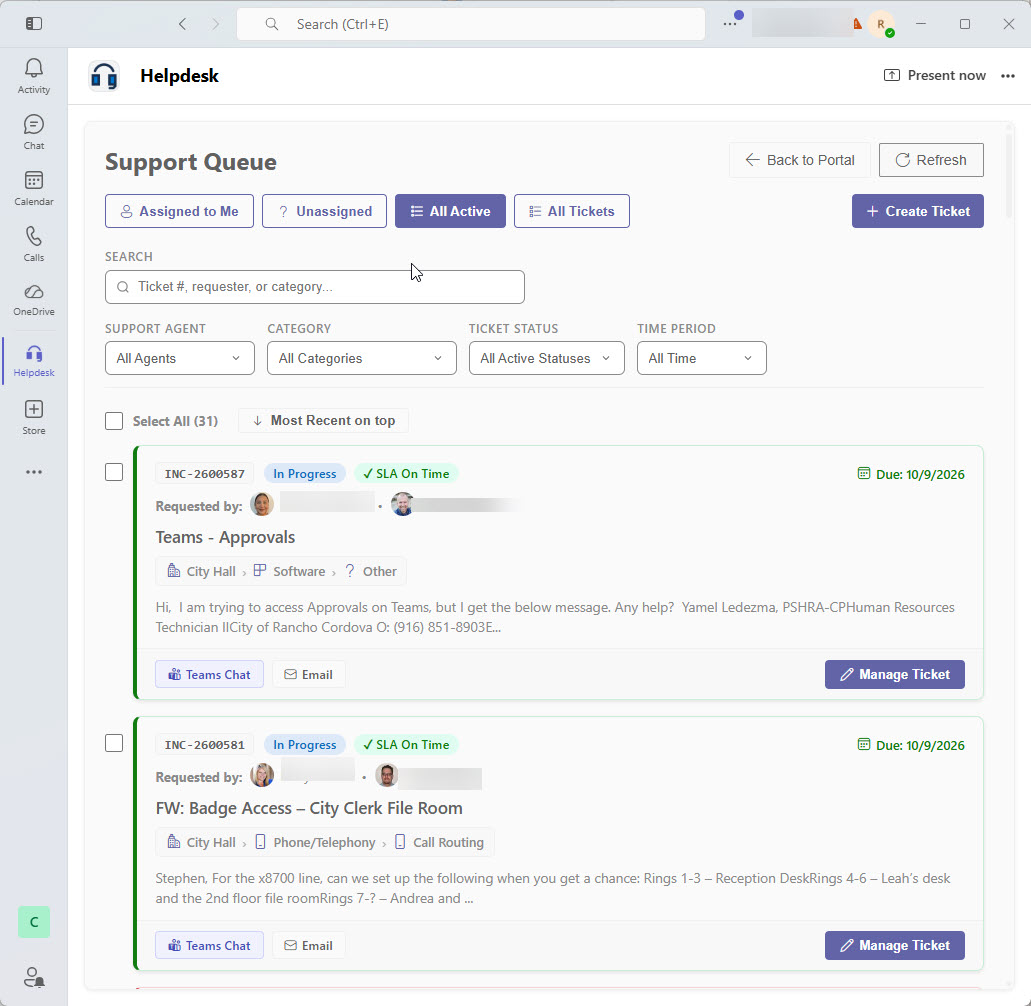
Work the queue without leaving Teams.
Built for teams of 2 to 10 technicians: see what's yours, what's unassigned and what's about to breach.
- Assigned to me, unassigned, claim and bulk update
- Auto-routing by category, with a backup technician
- Phone intake mode for calls and walk-ins
For leadership
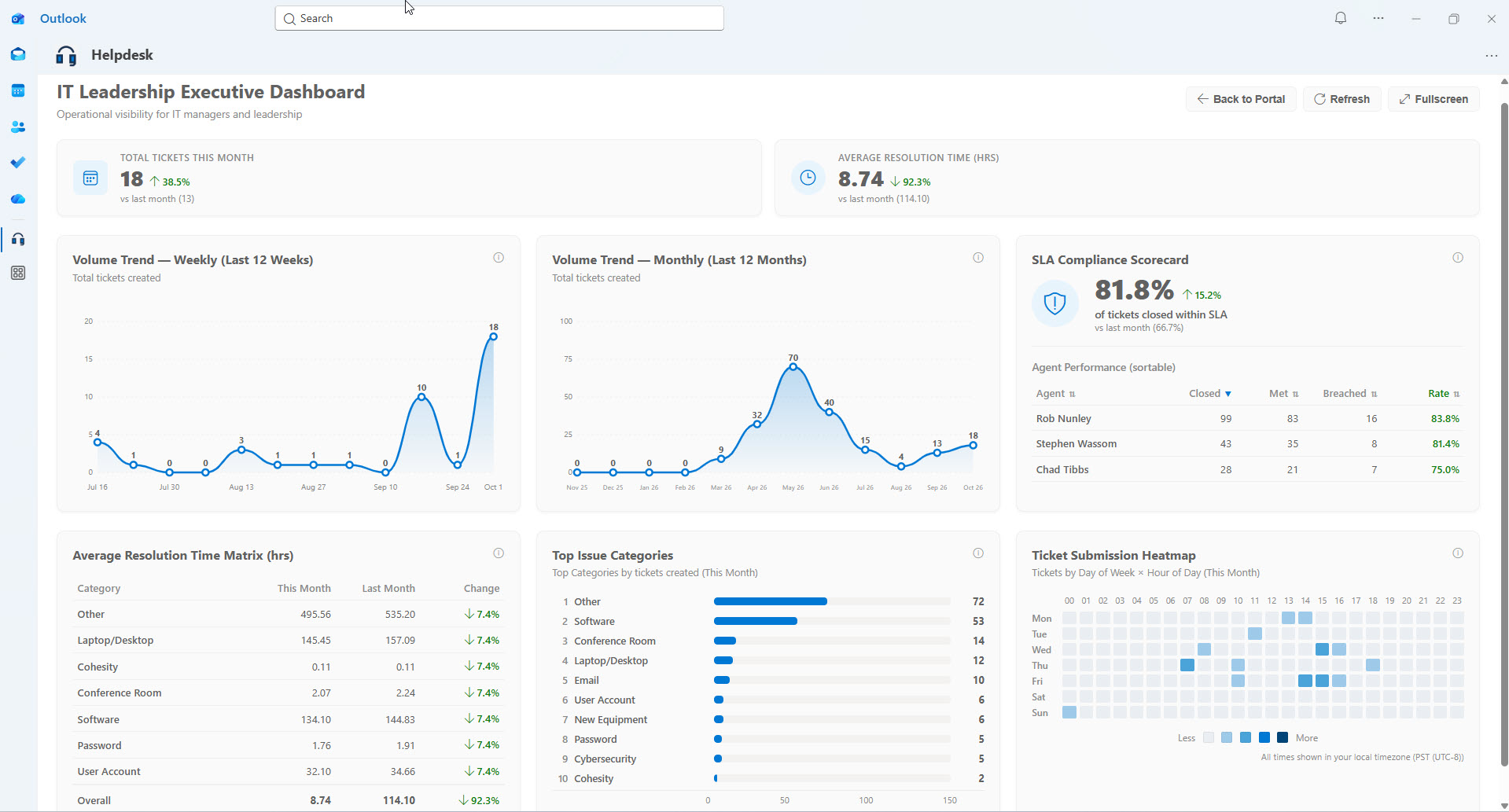
Know where the time goes, without buying Power BI seats.
Dashboards render right in SharePoint and Teams, so everyone who needs the numbers can see them.
- SLA compliance and median resolution time
- Resolution time by category and workload by technician
- A day-by-hour heatmap for staffing, plus CSV export
Field & Mobile Operations
From the office desk to field operations: truly multi-device.
Whether technicians are at their multi-monitor desks in Classic or New Outlook, or roving facilities with an iPad or smartphone, the operational workspace adapts seamlessly with zero friction.
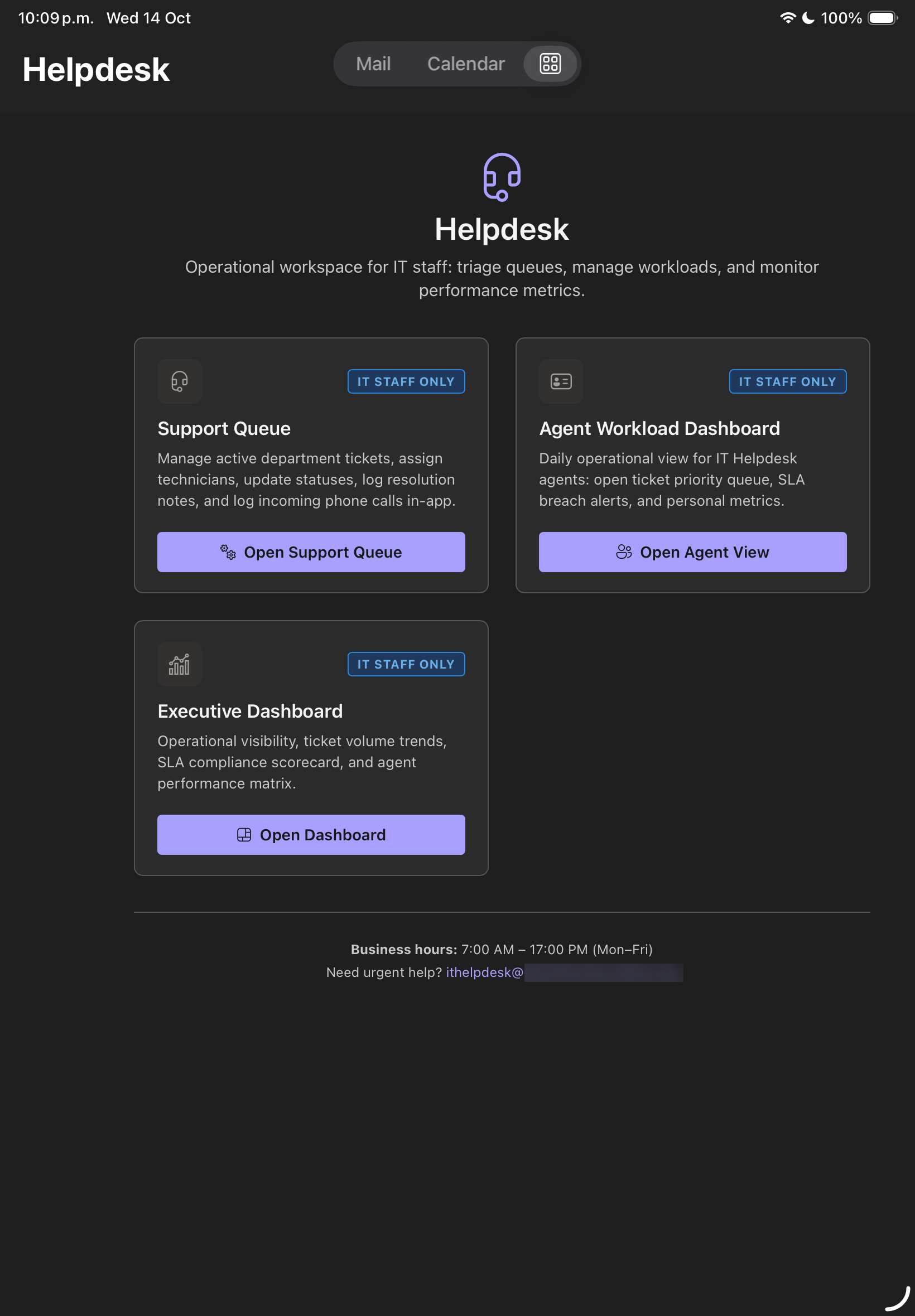
- Full queue triage, SLA breach alerts, and ticket management inside Outlook App on iPadOS
- Touch-optimized mobile experience in Microsoft Teams on iOS and Android
- Phone intake mode with Entra ID employee lookup for dispatchers and walk-ins
- Instant photo and document uploads straight from device cameras in the field
Your data, your tenant
Everything runs, and stays, in your Microsoft 365.
GovDesk 365 installs from your tenant app catalog. Tickets, attachments and history live in SharePoint lists you own, under your retention policies, your security groups and your audit log.
No vendor database to review. No external login. Core workflows use standard Power Automate connectors, so no premium licenses are needed.

One platform, separate desks
Same interface for staff. Separate queues, rules and permissions.
Each department gets its own SharePoint site, lists and security groups. Adding a desk is setup work, not a new block of agent licenses.
| Attribute | IT | Facilities | HR |
|---|---|---|---|
| Categories | Hardware, software, access | HVAC, plumbing, electrical | Onboarding, benefits, payroll |
| Assets | Rooms, copiers, laptops | Boilers, elevators, vehicles | Badges, ergonomic equipment |
| Example SLA | 4h critical, 24h standard | 2h leak, 48h routine | 24h verification, 5-day inquiry |
| Who sees tickets | IT technicians only | Facilities team only | HR team only |
The Clear Choice
Legacy External Portals vs. GovDesk 365 Digital Workplace
Why local governments choose native Microsoft 365 integration over expensive, disconnected ticketing silos.
| Comparison Dimension | Traditional Portals (ServiceNow, Freshdesk, Zendesk) | GovDesk 365 (Native Digital Workplace) |
|---|---|---|
| Point of Access | Disconnected web URL requiring separate credentials. | Directly inside Teams and Outlook on Desktop, iPad & Mobile. |
| Cultural Disruption | High. Staff resist learning new tools and resort to hallway conversations. | Zero. Respects existing daily routines and tools employees already use. |
| Licensing Model | $50–$150 per agent/month. Penalizes you as your team expands. | Unlimited agents & requesters. Flat in-tenant ownership with zero per-seat fees. |
| Data Sovereignty | Stored in multi-tenant vendor cloud databases outside your control. | 100% in your Microsoft 365 tenant under your security, MFA & retention. |
| Multi-Department Reach | Usually confined to IT due to high add-on license costs. | Unified across IT, Facilities and HR with separate secure queues. |
| Field & Mobile Access | Requires downloading and configuring separate vendor mobile apps. | Pre-installed native apps: Outlook App on iPad and Teams Mobile on iOS/Android. |
Is it a fit?
Honest about where it fits.
GovDesk 365 is a good fit if
- You run Microsoft 365 and your staff live in Teams and Outlook
- Each department has roughly 2 to 10 technicians
- Facilities or HR has no ticketing tool today
- Your security team wants data to stay in your tenant
Look elsewhere if
- You need formal ITIL change advisory boards or a CMDB
- You run a large, multi-site service desk with hundreds of agents
- You need built-in call center telephony
How to start
A 14-day pilot in your tenant, with pass or fail criteria agreed up front.
- Days 1–2
Assisted install
We deploy with your admin into a pilot site.
- Days 3–7
Real requests
Your technicians and about 10 staff use it for live work.
- Days 8–12
Tune routing
Adjust categories, SLAs and the Outlook add-in.
- Days 13–14
Readout
Results against the agreed criteria. You decide.
Questions
What buyers usually ask.
What licenses do we need?
Microsoft 365 with SharePoint Online, Teams and Exchange Online. Core workflows use standard Power Automate connectors included in most Microsoft 365 plans. Dashboards don't need Power BI Pro.
Does any of our data go to your servers?
Ticket data, attachments and history are stored in SharePoint lists in your own tenant. The app installs from your tenant app catalog and runs in the user's browser.
Do we need someone who knows PowerShell?
No. Installation is assisted: we deploy it together with your Microsoft 365 admin during the first two days of the pilot.
Can Facilities see IT tickets?
No. Each department's desk is its own SharePoint site with its own lists and security groups. Staff file every request the same way, but each team only sees its own queue.
Does it work in GCC tenants?
Yes, it's built for Microsoft 365 commercial and GCC environments. We confirm the details for your tenant during discovery.
Is GovDesk 365 a Microsoft product?
No. GovDesk 365 is built on Microsoft 365 by Insights Data Software and is not affiliated with or endorsed by Microsoft.
Why not use ServiceNow, Freshdesk, or Jira Service Management?
Those platforms are built as external portals with steep per-seat license taxes ($50–$150/agent/mo). In local government, staff resist external portals and bypass them with direct emails. GovDesk 365 eliminates cultural disruption by embedding the helpdesk directly into the daily tools staff already live in (Outlook and Teams) with zero per-seat fees.
Does it really work on mobile devices and iPads for field staff?
Yes. The entire support workspace and staff intake form are fully certified to run inside the native Microsoft Outlook App and Microsoft Teams Mobile App across iPadOS, iOS, and Android. Technicians can claim tickets, triage SLAs, and log resolution notes in the field without carrying a laptop.
See it live in 30 minutes, then pilot it in your tenant.
Bring your IT lead and whoever runs Facilities. We'll show the staff, technician and leadership views, then agree pilot criteria if it fits.
Book a demo